Welcome to Synqly!
Our platform provides a simple, secure, and sustainable interface for integrating with third-party platforms, enabling you to connect once and immediately give your users access to multiple services.
At the core of our integration platform lies a transformative abstraction layer that enables connections between cybersecurity and IT Operations solutions, via a unified API. This layer enables you to integrate with a diverse ecosystem of products to meet your customer's integration requirements.
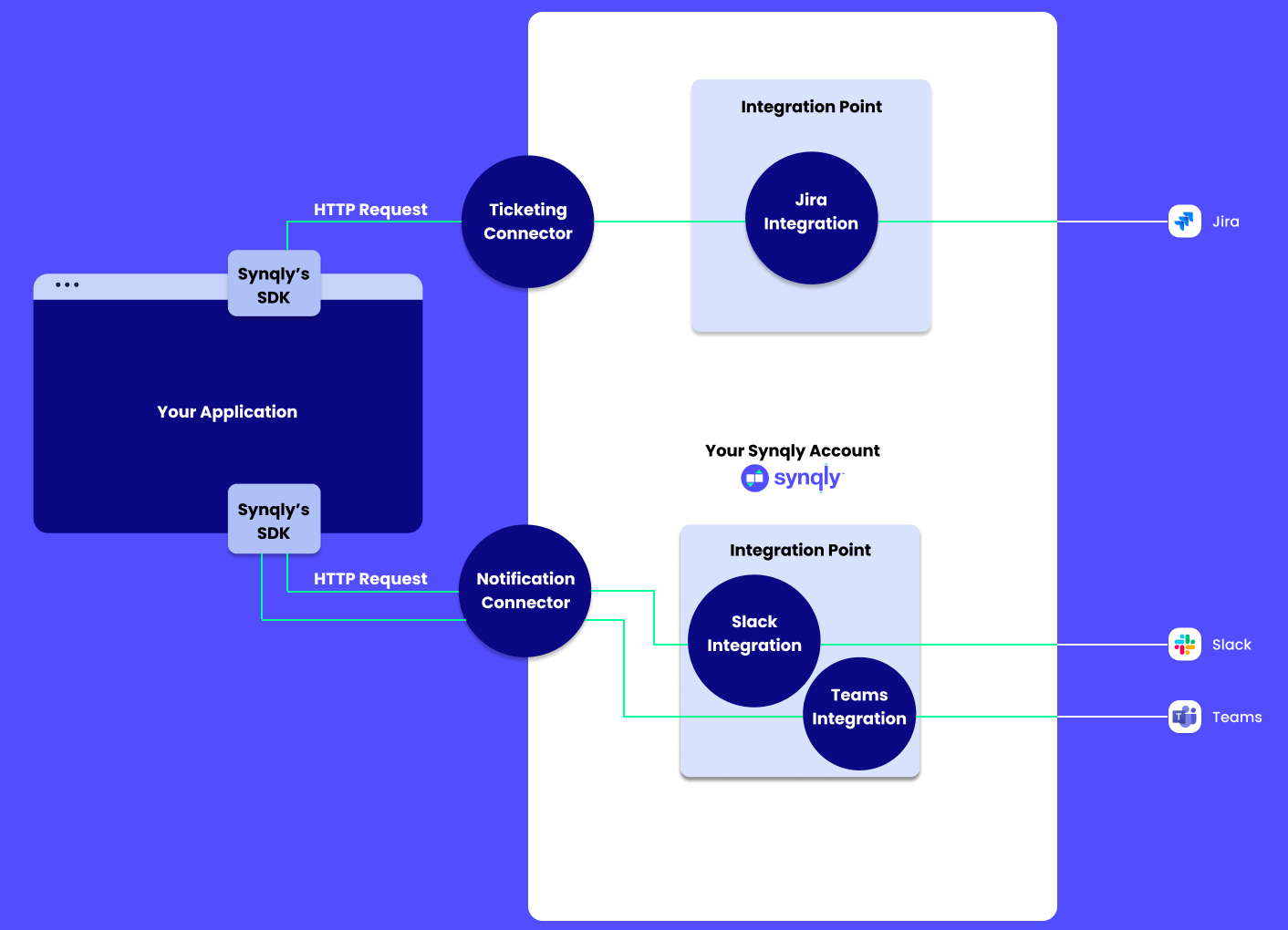
When working with Synqly you will come across some terminology that have specific meaning within the Synqly system:
- Connector: A unified API and data model for each category of providers (e.g., Messaging, Ticketing, Storage). Connectors offer a single interface for multiple providers in the same category.
- Provider: A specific third-party service within a Connector category, such as Jira or ServiceNow within the ticketing Connector. Synqly translates your requests to interact with the multitude of Providers supported within any given Connector category.
- Account: A group of integrations and associated resources, typically representing a customer or tenant in your system.
- End User: The customer of your customer, someone who registers Integrations (e.g., connecting Jira to Synqly).
Understanding the Synqly data model ensures a smooth getting started experience. The diagram provides a high level overview of the models you will come across while working with Synqly.
At the root of the Synqly data model is the Organization, which contains all other resources. An Organization represents a complete integration system, and may serve multiple applications and tenants.
The resources directly owned by an Organization are Accounts, Integration Points, Mappings, and Organization Members. These models are described in the following sections.
Within each Organization there may be any number of Accounts. They represent the owner of Integrations and will contain any associated data like configuration and Credentials.
Accounts are secure containers, meaning any data contained within is segregated from other Accounts to ensure data privacy. Because of this property Accounts are the main multi-tenancy primitive in the Synqly data model.
We recommend that you create at least one Account per tenant in your system, but you may also create more or fewer Accounts, depending on your data segregation requirements.
Accounts contain Integrations and Credentials.
An Integration represents a connection to a specific Provider supported by Synqly. The connection is described by a collection of Provider specific properties, including Credentials.
Whenever calling a Connector operation, such as Identity / Query Audit Log or EDR / Query Threat Events, you will be calling the operation using a specific Integration.
Integrations may be linked to Credentials, which represent specific configuration details that must be kept secret. This includes things such as OAuth Client Credentials, API keys, usernames and passwords etc.
Integrations may be linked to one or more Credentials, depending on the details of that Integration's configuration.
Credentials may be owned either by an Account, in which case it's considered a shared Credential that may be reused by multiple Integrations within the same Account. It is not possible for Integrations in different Accounts to share the same Credential.
Credentials may also be owned by an Integration, in which case no other Integration may share that Credential. This is the most typical and recommended approach to managing Credentials, as this ensures Synqly will remove any associated Credentials when an integration is removed.
Integration Points represent a group of Integrations, within a single Connector category. Integration Points may also be associated with supplemental resources such as Mappings, to enable consistent configuration across the Integrations in the group.
Integration Points also act as validators for any integrations added to the group. For example, an integration may declare that only specific Providers within that category should be supported, denying the creation of any Integrations that do not fit the specified requirements.
Mappings are an advanced feature that allows you to customize the default data mapping implemented by Synqly. They can be used to either augment the existing mapping chains, or replace the data mappings entirely.
To read more about Mappings, please see our sections on customer defined mappings and adaptive mapping.
Members are users that have access to your Synqly Organization, either via the API, Management Console, or both. Typically this will be engineers or support personel in your team, but can also be services.
Synqly supports member accounts both for individuals as well as service accounts.
Now that you are familiar with the Synqly data model and concepts it's time to start exploring the APIs. Select which interface you want to use, SDK or HTTP.
For a list of all currently supported SDKs, refer to our Synqly SDK guide.
If your application is written in a language that does not yet have a Synqly SDK, head to Getting Started with Direct HTTP to learn how to use Synqly via a direct HTTP client such as curl.